Open the detailer's model
File → Open Model opens an IFC from Tekla, SDS2 or anything else that writes the standard. The whole model is on screen in a moment, and it comes with its tonnage: every piece, by profile, weighed the way the model says.
Download free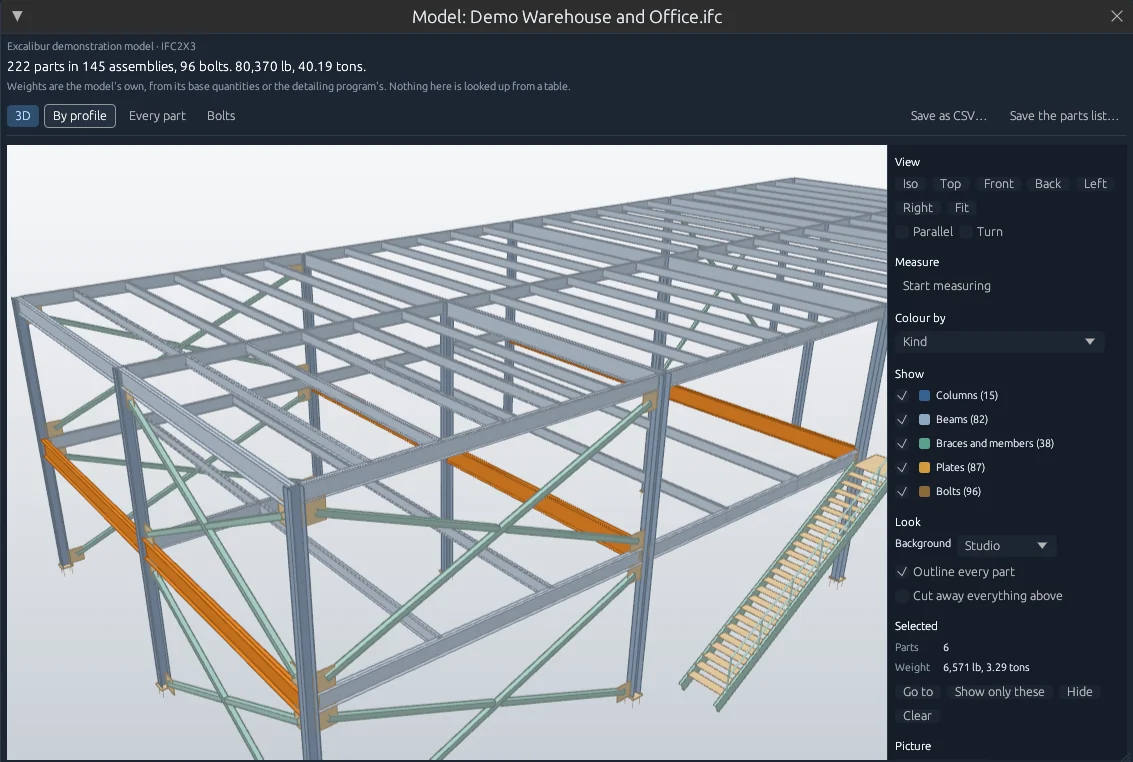
Excalibur View 0.6.9 on a fictional demonstration model.
Turn it, click it, measure it
Everything a PM, an erector or a customer asks of a model, without a Tekla seat.
- Drag to turn, right-drag to move, scroll to zoom to the pointer
- Iso, Top, Front, Back, Left and Right, and a parallel view for elevations and plans
- Click a piece for its profile, mark, assembly, material, length and weight
- Ctrl-click to add pieces, double-click to go to one, Esc to clear
- Measure between two points; corners and edges catch the pointer
- Distance, how far across and how far up, and each point's elevation, in feet and inches
- Colour by kind, profile or assembly
- Show or hide columns, beams, braces, plates or bolts
- Cut away everything above a height to look inside a floor
- Outlines on every part, the way a detailer draws them
- Save the view as a PNG at twice its size on screen, on a transparent background if you want one
- Turn: spins it slowly, for a screen at a show or in a meeting
The tonnage is the model's own
The weights come from the model: the standard's base quantities, or the quantity set the detailing program wrote. Nothing is looked up from a table.
A piece the model gives no weight for is counted, named and left out of the total, with a warning at the top. Colour the model by where each weight came from and those pieces show up in red, so you can see them before anybody prices the job.
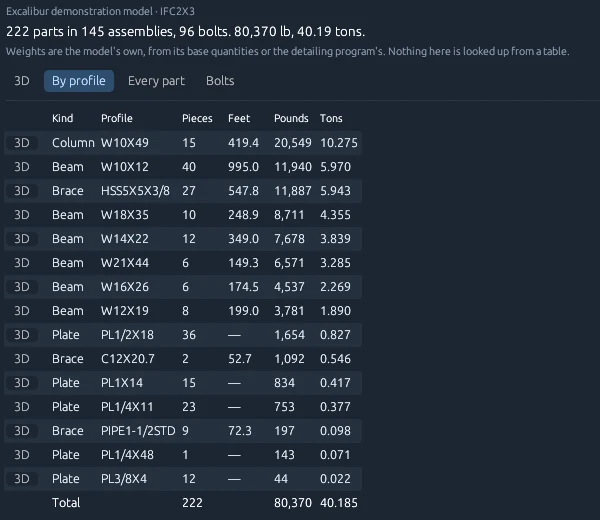
By profile gives pieces, feet, pounds and tons for each section, heaviest first. Every part lists each piece with its mark, assembly and where its numbers came from. Bolts counts them by size. Either list saves as CSV.
Every row has a 3D button that lights those pieces up in the model.
Fast on a real job
On a Tekla model of 4,192 parts, a 9.8 MB file, every piece is on screen in under half a second. The holes and copes are then cut in on the computer's other cores while you look around, the quickest first. A ladder rail with fifteen rung holes can take over ten seconds on its own, and nothing waits for it.
The model is drawn on a thread of its own, so the rest of the program never stops for it. It uses the graphics card when there is one, and a computer without one still draws it, just slower.
What it opens
IFC files, tested on models written by Tekla Structures and SDS2. Drop one on the window or use File → Open Model (IFC)… On Windows, right-click an .ifc file for Open in Excalibur View. Whatever opens IFC files on your computer now stays the default.
It reads the model and shows it. It doesn't change the file, and nothing in it leaves your computer.
Common questions
Is it in the free version?
Yes. Opening a model, the 3D view, measuring and the tonnage are all in the free desktop program.
Where do the weights come from?
From the model itself: its base quantities, or the detailing program's own quantity set. A piece with no weight in the model is reported as unweighed and left out of the total, never counted as nothing.
Does it change my model?
No. It reads the IFC file and never writes to it.
Can I show a customer the model without a Tekla license?
Yes. Open the IFC, turn it to the view you want, and save a picture, or put it on a screen with Turn switched on.
Open your last job's model
Free for one person, no account. See whether the tonnage matches what you bid.